
-
Ensure the system is in an OFF state:
- Scroll left-to-right to access the "H2 Command" screen.

- Ensure the system is stopped by pressing "STOP". If it shows "START OPEN" and "START CLOSE", the system is already in the correct state.
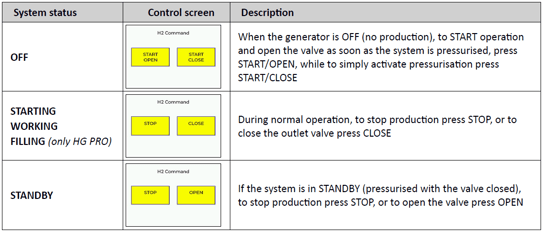
- Scroll left-to-right to access the "H2 Command" screen.
- Run an internal leak test:
- Navigate back to the summary screen and hold the screen for 0.5 sec to access the Menu.
- Scroll left-to-right until the "Tests" option appears. Press and hold the screen for 0.5 sec to enter the Tests menu.
- Select "Internal Leak" by pressing and holding the screen for 0.5 sec. The test will be performed and report a pass/fail result.
- If it passes, continue to the next step. If it fails, try once more and report back to support@uvison.com.
- Run an external leak test:
- Make sure there is no demand for H2 from any application (GC, etc.) and that the external line is sealed so it can pressurise!
- Navigate back to the "Tests" menu and select "External Leak" by pressing the screen for 0.5 sec. The test will be performed and report a pass/fail result.
- If it passes, report back to support@uvison.com. If it fails, it is likely an issue unrelated to the generator. Continue to the next step to confirm.
- Eliminate any possibility of a generator leak:
-
- Remove the 1/8" fitting from the rear of the generator and fit a blanking nut. Secure it correctly, taking care not to cross-thread or overtighten.
- Re-run the external leak test. If it fails, report back to support@uvison.com. If it passes, the leak is on the gas lines that run from the generator and should be resolved.